Introduction
As a Team Leader you will manage members in your team. You will receive an email from the Project Controller (PC) confirming your access to ActivityExchange.
Accessing Your Project
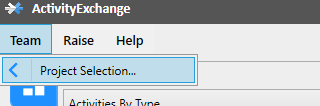
Select Team tile on top left, and select 'Project Selection'.
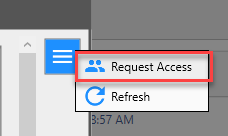
Select 'Menu' icon and 'Request Access' option.
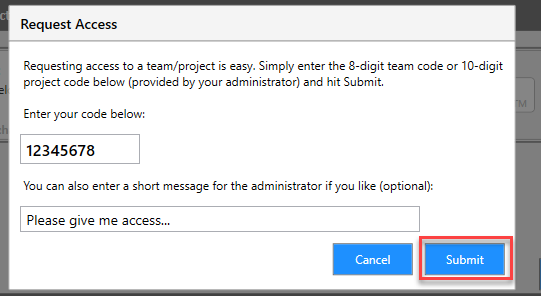
Enter the code provided by the Project Controller and "Submit".
Once access is provided 'Refresh' your screen by selecting the 'Menu' icon. If you don't have access please notify your PC. Ensure you are signed in as the Team Leader before progressing.
Team Leaders Initial Set-Up Process
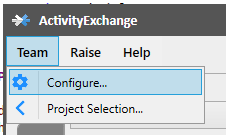
Once you have access to your team and have logged in you will be able to Configure your team. Select the 'Team' from menu tab and select 'Cogs Wheel' icon which will take you to the 'Configure' window'.
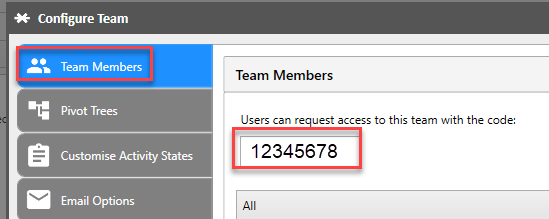
Select 'Team Members' tab. In the top part of the screen, a 8-digit code is displayed. Advise your selected Team Members (TM) of this code as they will need it when accessing AE via their mobile device.
Approving Team Member Access
An 'Access Request Notification' email will be sent to your nominated e-mail account when a TM has requested access. If your TM request is not visible on the screen, select 'Refresh' in the 'Configure Team' window and continue with your approval process.
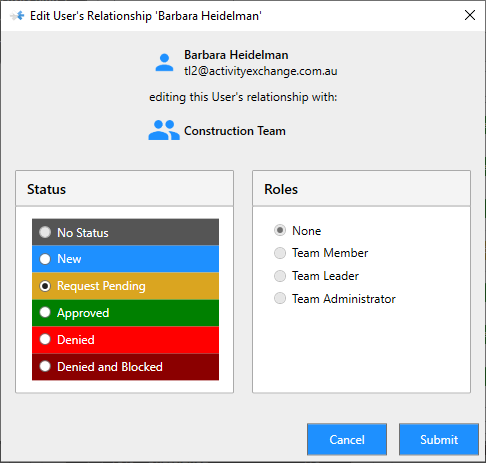
As your TM request access to your project their name will appear on the Team Members tab with the narration 'Request Pending' against their name. Highlight the team member you want to approve and select 'Edit'. The 'Edit Users Relationship' window will allow you confirm the TM status and role. Select 'Submit' when you have completed your selection.
Roles
The following table describes the permissions associated with each role:
| Role | View Activities | Create & Edit Activities | Assign Activities | Create & Export Reports | Team Configuration |
|---|---|---|---|---|---|
| Team Viewer | All | No | No | Yes | No |
| Team Member | Assigned Only | Yes | No | Yes | No |
| Team Leader | All | Yes | Yes | Yes | No |
| Team Administrator | All | Yes | Yes | Yes | Yes |